X (Twitter)

$195 per guest
ClassBento money-back guarantee
Our mission is to improve mental wellbeing through our workshops and experiences. We curate our teachers and hosts carefully to ensure that they are of high quality.
That's why we provide a money-back guarantee*: If you're unsatisfied with this experience, just leave it at least 20 minutes before it ends, and tell us (the ClassBento team) the reason for your dissatisfaction within 4 hours of that time, and we'll provide you with a refund.
* We may choose to limit our refund per customer at $1000. In some rare cases, we may also require you to show us your photo ID before we process the refund.
Please choose a time
Please choose a date and time by clickingtapping the dropdown menu (that's just to the left of the button you clicked), before clicking the 'Buy' button.






Nearby stores
Done!
We've added you to the waitlist for this class - we'll automatically notify you via email when new dates become available.
How Afterpay works


Please note: Afterpay is not available on bookings of over $1,000, and on certain classes.
Book now, pay later
With Zip, you can book now to ensure you don't miss out on the date you like, and pay later, interest free (nothing to pay today).
Just proceed to the checkout, and use the "Zip" option for payment.
Over 800,000 Australians use Zip. Learn more about Zip.
Request a class
Pick time(s) that suit you, and ask any questions
reply
We'll respond via email & text message
(with a booking link), usually within minutes
check
This teacher has accepted 100% of their Requests
check_circle
You'll be in good hands. This teacher is rated 4.9 out of 5, from 59 reviews
Select a time
Pick a time on
ClassBento money-back guarantee
Our mission is to improve mental wellbeing through our workshops and experiences. We curate our teachers and hosts carefully to ensure that they are of high quality.
That's why we provide a money-back guarantee*: If you're unsatisfied with this experience, just leave it at least 20 minutes before it ends, and tell us (the ClassBento team) the reason for your dissatisfaction within 4 hours of that time, and we'll provide you with a refund.
* We may choose to limit our refund per customer at $1000. In some rare cases, we may also require you to show us your photo ID before we process the refund.
How can we help?
Q: What's the cancellation policy?
A: No cancellations or reschedules allowed
Q: How long does the class run for, and what's the price?
A: 4 hours, $195 per guest
Please enter your name
Please enter a valid email
Please enter a message
You did not pass the Captcha test. Please click the button to try again
done Thanks, we'll be in touch






Introduction to Photoshop Class
Learn Photoshop without the fear factor
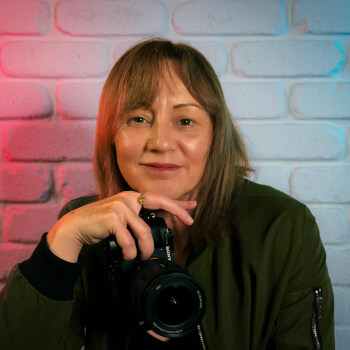
Gilham-Martin Media
4.9 (59)
 4 hours
 2 to 9 guests
 $195
(PayPal Pay in 4 available)
$195
(PayPal Pay in 4 available)
What you'll do
redeem
Get 15% off gift cards, using the code GIFTING15 in the checkout.
Offer ends soon.
arrow_right_alt arrow_downward- Understanding the Photoshop interface
- How layers work (explained simply)
- Adjustment layers vs direct edits
- Cropping and straightening
- Spot removal and basic clean-ups
- Simple dodge & burn for tonal balance
- Saving and exporting correctly
- Guided, step-by-step instruction
- Live demonstrations you can follow along with
- Clear explanations without jargon
- A supportive, beginner-friendly environment
- Time for questions and troubleshooting
- Practical examples using real-world images
- Beginners to Photoshop
- Lightroom users wanting to expand their skills
- Photographers wanting more control over their edits
- Creatives who want clean, professional results
- Heavy photo manipulation or composites
- Advanced retouching
- Graphic design or digital art workflows
info
This class is not available for purchase
What you'll get
- Camera Raw (Photoshop’s Editing Foundation)
- What Camera Raw is and how it fits into your workflow
- Differences between Camera Raw and Lightroom
- Using Camera Raw to adjust:
- Exposure and contrast
- White balance and colour
- Highlights and shadows
- Presence and sharpening
- Local adjustments using masks in Camera Raw
- When to finish in Camera Raw vs when to move into Photoshop
Knowledge required
Beginner. No prior Photoshop experience is required.
What to bring
- Laptop with Adobe Photoshop installed
- A mouse (strongly recommended)
- A small selection of RAW images
- Basic computer skills
Your teacher
Claire Gilham-Martin is a Perth-based photographer, videographer, and educator whose work captures the quiet, cinematic beauty of Western Australia. Drawn to moody tones, reflective light, and the emotion of stillness, Claire transforms familiar coastal and urban landscapes into stories of atmosphere and place.Through her photography workshops and mentoring, Claire empowers others to see with intention — guiding students from automatic settings to confident manual control. Her teaching style, often described as patient, clear, and inspiring, helps beginners and enthusiasts alike understand not just how to take a photo, but why it matters.With a background in both photography and videography, Claire bridges artistry and technical mastery. Whether behind the lens or leading a hands-on class at Perth landmarks like Elizabeth Quay and Fremantle’s Round House, she shares the same passion: helping others discover the magic in light, mood, and moment.When she’s not editing or teaching, Claire can usually be found exploring the outdoors with her two Welsh Pembroke Corgis, Speckle and Licorice — her loyal (and often muddy) photography assistants. They’ve wandered through more shoots than most people she knows, always reminding her to slow down, look closer, and find joy in the small details.Claire’s landscape work continues to gain recognition on both national and international stages. Most recently, she reached the Top 101 in the International Landscape Awards 2025, placing Number 41 globally and having her image published in the official awards book. She also achieved Finalist status in the prestigious Landscape Capture Awards, with both of her submitted images. In 2024, Claire was awarded 3rd Place in the Australian & New Zealand Landscape Awards, her image was selected and published, a milestone that marked her continued progression in the competitive landscape photography world.

Gift this class
check
Printable digital gift card delivered instantly
check
Your recipient chooses the date
check
Use on this class, or our other experiences
check
Valid for 3 years
Join waitlist
Get updated when new dates for this class become available.
Unsubscribe any time.
Unsubscribe any time.
E.g. 'Sunday mornings', 'November', etc. We will still email you about other new dates
Please don't include your contact details in this field