





 X (Twitter)





$45 per guest
ClassBento money-back guarantee
Our mission is to improve mental wellbeing through our workshops and experiences. We curate our teachers and hosts carefully to ensure that they are of high quality.
That's why we provide a money-back guarantee*: If you're unsatisfied with this experience, just leave it at least 20 minutes before it ends, and tell us (the ClassBento team) the reason for your dissatisfaction within 4 hours of that time, and we'll provide you with a refund.
* We may choose to limit our refund per customer at $1000. In some rare cases, we may also require you to show us your photo ID before we process the refund.
Please choose a time
Please choose a date and time by clickingtapping the dropdown menu (that's just to the left of the button you clicked), before clicking the 'Buy' button.
Nearby stores
How Afterpay works
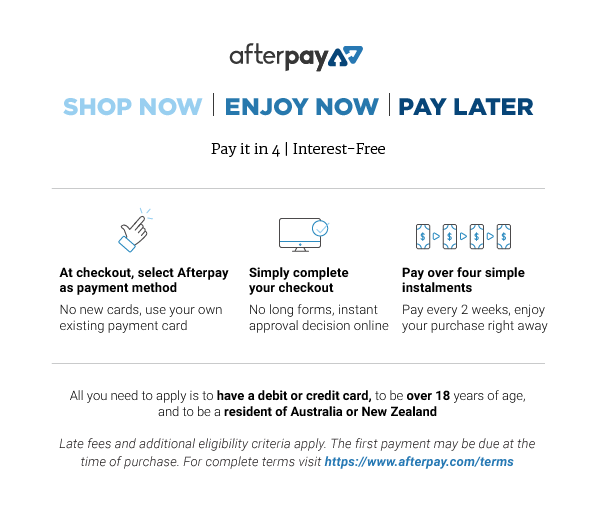

Please note: Afterpay is not available on bookings of over $1,000, and on certain classes.
Book now, pay later
With Zip, you can book now to ensure you don't miss out on the date you like, and pay later, interest free (nothing to pay today).
Just proceed to the checkout, and use the "Zip" option for payment.
Over 800,000 Australians use Zip. Learn more about Zip.
Request a private class
Pick time(s) that suit you, and ask any questions
reply
We'll respond via email & text message
(with a booking link), usually within minutes
FAQs (1)
What happens after I purchase the course?
You'll be emailed a link via ClassBento which will direct you to the website page to create an account and log into the course content.
Ask a question
Don't include your phone or email in this message
check_circle
You'll be in good hands. This teacher is rated 5.0 out of 5, from 290 reviews
Pick a time on
ClassBento money-back guarantee
Our mission is to improve mental wellbeing through our workshops and experiences. We curate our teachers and hosts carefully to ensure that they are of high quality.
That's why we provide a money-back guarantee*: If you're unsatisfied with this experience, just leave it at least 20 minutes before it ends, and tell us (the ClassBento team) the reason for your dissatisfaction within 4 hours of that time, and we'll provide you with a refund.
* We may choose to limit our refund per customer at $1000. In some rare cases, we may also require you to show us your photo ID before we process the refund.
How can we help?
Q: What happens after I purchase the course?
You'll be emailed a link via ClassBento which will direct you to the website page to create an account and log into the course content.
Q: What's the cancellation policy?
A: Free to cancel or reschedule up until 3 days before the event
Q: How long does the class run for, and what's the price?
A: 1.5 hours, $45 per guest
Bayside Makerspace usually responds
within a few hours
Please enter your name
Please enter a valid email
Your teacher won't see this
Please enter a message
done Thanks, we'll be in touch
Need a thoughtful gift idea?
card_giftcard Gift an experienceLearn Cricut Design Space for Absolute Beginners
Learn Design Space from scratch with simple, beginner-friendly lessons that you can pause, rewind, and repeat.

Bayside Makerspace
5.0 (290)
ClassBento donates
with every order to

 $45
$45
What you'll do
redeem
Get 15% off gift cards, using the code GIFTING15 in the checkout.
Offer ends soon.
arrow_right_alt arrow_downward
Knowledge required
Beginner-friendly, no skills required.
What to bring
To learn at home, you'll need a device with Design Space software and a Cricut machine to complete the projects at the end. To just watch the course content, you can do so on your phone or any device.
FAQ
What happens after I purchase the course?
You'll be emailed a link via ClassBento which will direct you to the website page to create an account and log into the course content.
Your teacher
Workshops, creative co-working, community. A space for you to get creative in a cozy environment for small group workshops, casual creative gatherings and co-working desks for work or play. Based in the heart of Chelsea, you can create all morning, go for a beach walk and skip back onto the train station in this central location in bayside. Bayside Makerspace is also available for hire to inspire.
verified_user
ClassBento has verified that Bayside Makerspace has a valid Working with Children Check clearance.
Gift this class
check
Also usable on ClassBento's 16,000+ other
experiences
check
Happiness guaranteed, or your money back
check
Valid for 3 years
Join waitlist
Get updated when new dates for this class become available.
Unsubscribe any time.
Unsubscribe any time.
E.g. 'Sunday mornings', 'December', etc. We'll still email you about other new dates
Please don't include your contact details in this field
Gifting? Get a gift card, and your recipient can pick a date later.