




 X (Twitter)



$537 per guest
ClassBento money-back guarantee
Our mission is to improve mental wellbeing through our workshops and experiences. We curate our teachers and hosts carefully to ensure that they are of high quality.
That's why we provide a money-back guarantee*: If you're unsatisfied with this experience, just leave it at least 20 minutes before it ends, and tell us (the ClassBento team) the reason for your dissatisfaction within 4 hours of that time, and we'll provide you with a refund.
* We may choose to limit our refund per customer at $1000. In some rare cases, we may also require you to show us your photo ID before we process the refund.
Please choose a time
Please choose a date and time by clickingtapping the dropdown menu (that's just to the left of the button you clicked), before clicking the 'Buy' button.
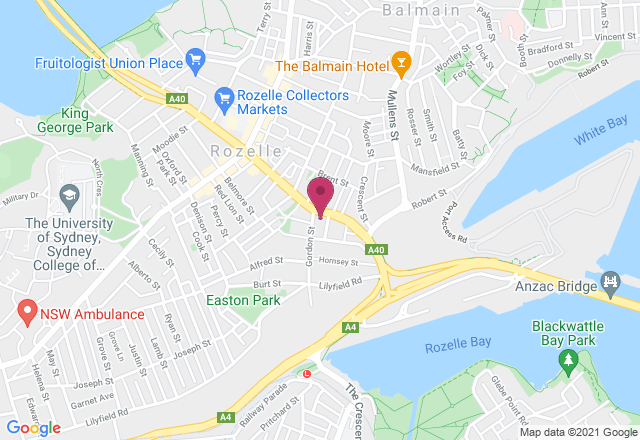
Nearby stores
Sorry, you just missed it
The date in our email has already been booked. Spots can sell out within minutes of new dates being released, so the best way to get in next time is to book as soon as our email lands.
You're still on the waitlist, so we'll email you as soon as new dates are added.
How Afterpay works
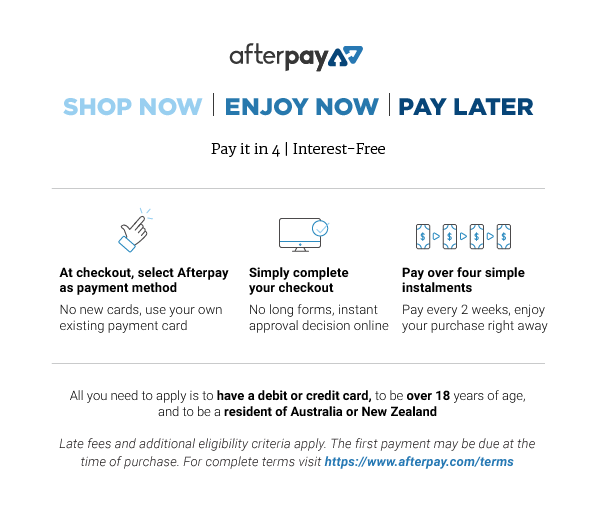

Please note: Afterpay is not available on bookings of over $1,000, and on certain classes.
Book now, pay later
With Zip, you can book now to ensure you don't miss out on the date you like, and pay later, interest free (nothing to pay today).
Just proceed to the checkout, and use the "Zip" option for payment.
Over 800,000 Australians use Zip. Learn more about Zip.
Request a private class
Pick time(s) that suit you, and ask any questions
reply
We'll respond via email & text message
(with a booking link), usually by the next business day
Here you'll just specify the first date of your class series.
This class series runs over 2 consecutive days.
check_circle
You'll be in good hands. This teacher is rated 4.8 out of 5, from 316 reviews
Select a time
Pick a time on
ClassBento money-back guarantee
Our mission is to improve mental wellbeing through our workshops and experiences. We curate our teachers and hosts carefully to ensure that they are of high quality.
That's why we provide a money-back guarantee*: If you're unsatisfied with this experience, just leave it at least 20 minutes before it ends, and tell us (the ClassBento team) the reason for your dissatisfaction within 4 hours of that time, and we'll provide you with a refund.
* We may choose to limit our refund per customer at $1000. In some rare cases, we may also require you to show us your photo ID before we process the refund.
How can we help?
Q: What's the cancellation policy?
A: Free to cancel or reschedule up until 7 days before the class
Q: How long does the class run for, and what's the price?
A: 2 x 6 hours, $537 per guest
Sydney Community College usually responds
by the next business day
Please enter your name
Please enter a valid email
Your teacher won't see this
Please enter a message
done Thanks, we'll be in touch
Need a thoughtful gift idea?
card_giftcard Gift an experienceAdobe After Effects Course for Beginners
Learn to animate graphics and visual effects in this Adobe After Effects Course for Beginners
ClassBento donates
with every booking to

 2 x 6 hours
 Rozelle
 5 to 20 guests
 $537
$537
What you'll do
Learning how to create animations has become an essential tool for developing digital content. Adobe After Effects enables you to create motion graphics and visual effects for film, TV, video, and the web. Whether you are a graphic designer, web designer, video editor, or even a visual artist, this two-day Adobe After Effects training course is designed to help you harness the power of the software and add a valuable skill to your creative toolkit.
This After Effects course will enable you to create cinematic film titles, intros, and transitions, animate logos and text, and create stunning visual effects. Open up a world of 2D & 3D animation and take on After Effects with this 2-day training course!
Learning outcomes
- Adequately use keyframes and layers to produce moving text and/or logos
- Understand composition workflow in the After Effects interface
- Understand the use of masks and how they apply to motion graphics
- Be able to plan and execute basic special effects tasks
Ideal for
Graphic designers, filmmakers, video editors, web designers, and visual artists may benefit the most from this course; however, this course is ideal for anyone interested in motion graphics and digital animation. Basic competency with computers is assumed before enrolling, proficiency in other Adobe software is helpful but not essential for enrollment.
Course content
This is an all-hands-on course with exercises that show and practise you in:
- Composition creation;
- Applying visual effects;
- Best practise when creating shapes;
- Creating, formatting, and editing text;
- Animating layers with keyframes;
- Understanding interpolation types;
- First steps in masking with layer masks;
- Importing stills/video footage – Transform techniques;
- Making one layer follow another with parenting;
This is a crash training course in Adobe After Effects, so the facilitator will aim to fit in as much content as possible; however, they might not be able to cover some of the above in time. If you have a specific aspect of the program you are interested in learning, then please let the tutor know.
What you'll get
This course runs in our computer lab, fitted with 27-inch Apple iMac systems as well as Dell computers running the Windows operating system. Both types of computers have the latest Adobe apps installed. Adobe products function the same on both Windows and Macintosh computers except for minor differences with keyboard usage and where files are located within the computer.
Read more details
Knowledge required
Beginner-friendly.
What to bring
- A USB stick (minimum 32GB) or portable hard drive (minimum 500GB) for storing your data (optional). - Pen and paper or device to take notes.
Session repeats
This class series runs over 2 consecutive days.
Your teacher

Antony Brown
Antony is an Adobe and Apple Certified Instructor with over 15 years of experience teaching industry-leading design software. He began his training career with Adobe in London and has since worked with major clients such as Microsoft, Yahoo, Westpac, and the Australian Federal Police.
Antony is an Adobe Certified Expert in Photoshop CC, After Effects CS5, Premiere Pro CC, Audition, and Video Specialisation, and holds Apple certifications in Final Cut Pro X and 7. He is passionate about empowering learners and helping them achieve lasting skill development.
Your host
Sydney Community College is a social enterprise with a mission to offer innovative continuing adult education programmes that support individual efforts and facilitate sustainable social change.Our mission is to enrich lives, to strengthen adult individuals and to build communities through innovative high quality continuing education and training.

Book on ClassBento and enjoy exclusive perks:
-
Earn loyalty points
-
Money-back guarantee* for peace of mind
-
Local support from our Sydney-based team, rated 5 stars by customers
-
Public liability insurance included for your protection
-
ClassBento donates $1 to Dementia Australia with every paid booking
Join waitlist
Get updated when new dates for this class become available.
Unsubscribe any time.
Unsubscribe any time.
E.g. 'Sunday mornings', 'December', etc. We'll still email you about other new dates
Please don't include your contact details in this field