X (Twitter)




$243 per guest
ClassBento money-back guarantee
Our mission is to improve mental wellbeing through our workshops and experiences. We curate our teachers and hosts carefully to ensure that they are of high quality.
That's why we provide a money-back guarantee*: If you're unsatisfied with this experience, just leave it at least 20 minutes before it ends, and tell us (the ClassBento team) the reason for your dissatisfaction within 4 hours of that time, and we'll provide you with a refund.
* We may choose to limit our refund per customer at $1000. In some rare cases, we may also require you to show us your photo ID before we process the refund.
Please choose a time
Please choose a date and time by clickingtapping the dropdown menu (that's just to the left of the button you clicked), before clicking the 'Buy' button.







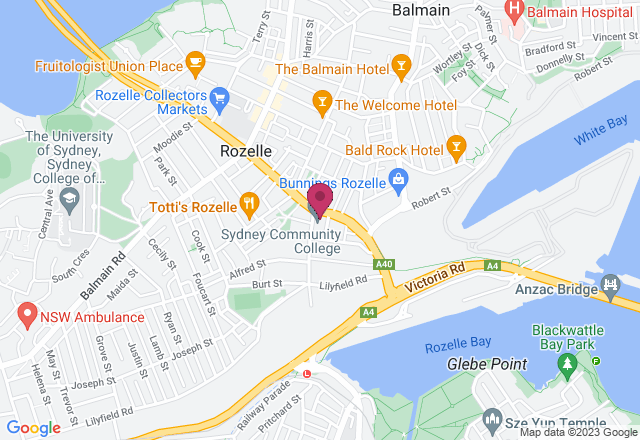
Nearby stores
Done!
We've added you to the waitlist for this class - we'll automatically notify you via email when new dates become available.
How Afterpay works


Please note: Afterpay is not available on bookings of over $1,000, and on certain classes.
Book now, pay later
With Zip, you can book now to ensure you don't miss out on the date you like, and pay later, interest free (nothing to pay today).
Just proceed to the checkout, and use the "Zip" option for payment.
Over 800,000 Australians use Zip. Learn more about Zip.
Request a private class
Pick time(s) that suit you, and ask any questions
reply
We'll respond via email & text message
(with a booking link), usually by the next business day
check_circle
You'll be in good hands. This teacher is rated 4.8 out of 5, from 313 reviews
Select a time
Pick a time on
ClassBento money-back guarantee
Our mission is to improve mental wellbeing through our workshops and experiences. We curate our teachers and hosts carefully to ensure that they are of high quality.
That's why we provide a money-back guarantee*: If you're unsatisfied with this experience, just leave it at least 20 minutes before it ends, and tell us (the ClassBento team) the reason for your dissatisfaction within 4 hours of that time, and we'll provide you with a refund.
* We may choose to limit our refund per customer at $1000. In some rare cases, we may also require you to show us your photo ID before we process the refund.
How can we help?
Q: What's the cancellation policy?
A: Free to cancel or reschedule up until 7 days before the class
Q: How long does the class run for, and what's the price?
A: 4 hours, $243 per guest
Sydney Community College usually responds
within a few hours
Please enter your name
Please enter a valid email
Your teacher won't see this
Please enter a message
You did not pass the Captcha test. Please click the button to try again
done Thanks, we'll be in touch
Need a thoughtful gift idea?
card_giftcard Gift an experienceAdobe Lightroom Photo Editing Course for Beginners
Gain skills in photo editing in this Adobe Lightroom course
ClassBento donates
with every booking to

 4 hours
 1 to 6 guests
 $243
(Afterpay & PayPal Pay in 4 available)
$243
(Afterpay & PayPal Pay in 4 available)
What you'll do
redeem
Get 15% off gift cards, using the code GIFTING15 in the checkout.
Offer ends soon.
arrow_right_alt arrow_downward- By the end of this Lightroom Classic Photo Editing course, you should be able to:
- Apply the functionality of Lightroom to process and manipulate photographic images
- Apply the fundamentals of photo editing and organisation in the Library and Develop modules
- Utilise the Lightroom workspaces smoothly and efficiently for viewing and processing images
- Create your own personal copyright metadata for your images
- Develop editing skills relevant to photography and visual content roles.
- What will be covered in this Lightroom Classic Photo Editing course?
- Lightroom’s Library and Develop module basics
- Importing and exporting image files
- How to view your photos as thumbnails, single images, and fullscreen
- Global image processing
- Navigating the Lightroom Classic workspace
- The essential Lightroom Classic tools and shortcuts
- Understanding the Lightroom catalogue and Catalogue backups
- Applying the precision, quality and flexibility of RAW file formats
- Using the global adjustment tools in the Basic panel
- Understanding the Histogram guidance and limitations
- Controlling Hue, Saturation and Luminance
- Cropping, rotating and re-sizing images
- Understanding exposure corrections and variations
- Manipulating image contrast, vibrance & saturation
- Clarity vs Texture vs Sharpening
- Black and White/Colour treatment and conversions
celebration
info
This class is not available for purchase
Knowledge required
Beginner welcome.
What to bring
Before attending the first class session:INSTALL and UPDATE Adobe Lightroom Classic (NOT Adobe Lightroom Cloud or Lightroom for the Web)SD card for transferring your camera images
Your teacher

Richard Lynch
Richard is one of Sydney Community College's most passionate tutors, over the past 10 years he has taught thousands of students and has been instrumental in the development of the photography program having designed and taught courses in beginners, creative photography, technical photography, iPhone photography, photo editing and street and documentary photography.
Richard has a long history as a freelancer as well as extended experience in consultancy in the training and assessment industry. Richard has recently added a qualification in photography – the Diploma of Photo Imaging to ensure a professional understanding of current developments in the industry.As a photographer in Fine Arts and Street photography, Richard exhibited in 2014 in the Rocks in Sydney, and was a participant in the HeadOn Festival in 2015 as an exhibitor in the Sydney Street Photographers Meetup Group exhibition ‘Urban Collective’ Richard also organises a Meetup Group that is focused on community participation and learning in all aspects of the specialist editing and image management application for photography – Adobe Lightroom.Richard's style is relaxed but chock full of information, discussion and fun.
Your host
Sydney Community College is a social enterprise with a mission to offer innovative continuing adult education programmes that support individual efforts and facilitate sustainable social change.Our mission is to enrich lives, to strengthen adult individuals and to build communities through innovative high quality continuing education and training.

Gift this artisan class
With our gift card, they can book this class at a time that suits them.
They can also choose from our 16,000+ other classes.
redeem Gifting optionsBook on ClassBento and enjoy exclusive perks:
-
Earn loyalty points
-
Money-back guarantee* for peace of mind
-
Local support from our Sydney-based team, rated 5 stars by customers
-
Public liability insurance included for your protection
-
ClassBento donates $1 to Dementia Australia with every paid booking
Join waitlist
Get updated when new dates for this class become available.
Unsubscribe any time.
Unsubscribe any time.
E.g. 'Sunday mornings', 'December', etc. We will still email you about other new dates
Please don't include your contact details in this field