X (Twitter)


$537 per guest
ClassBento money-back guarantee
Our mission is to improve mental wellbeing through our workshops and experiences. We curate our teachers and hosts carefully to ensure that they are of high quality.
That's why we provide a money-back guarantee*: If you're unsatisfied with this experience, just leave it at least 20 minutes before it ends, and tell us (the ClassBento team) the reason for your dissatisfaction within 4 hours of that time, and we'll provide you with a refund.
* We may choose to limit our refund per customer at $1000. In some rare cases, we may also require you to show us your photo ID before we process the refund.
Please choose a time
Please choose a date and time by clickingtapping the dropdown menu (that's just to the left of the button you clicked), before clicking the 'Buy' button.







Nearby stores
How Afterpay works
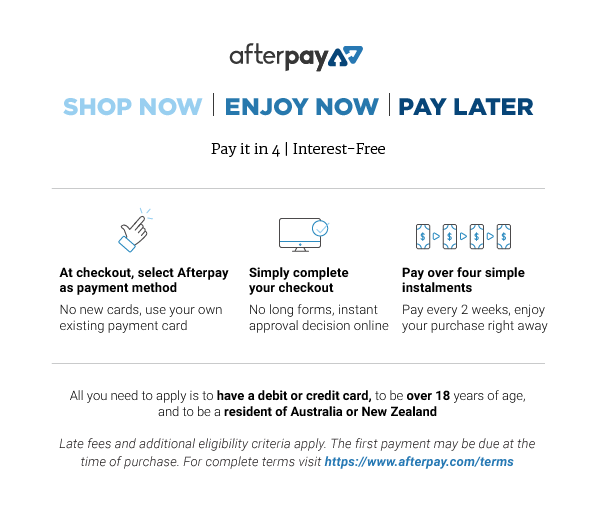

Please note: Afterpay is not available on bookings of over $1,000, and on certain classes.
Book now, pay later
With Zip, you can book now to ensure you don't miss out on the date you like, and pay later, interest free (nothing to pay today).
Just proceed to the checkout, and use the "Zip" option for payment.
Over 800,000 Australians use Zip. Learn more about Zip.
Request a private class
Pick time(s) that suit you, and ask any questions
reply
We'll respond via email & text message
(with a booking link), usually by the next business day
Here you'll just specify the first date of your class series.
This class series runs over 2 consecutive days.
check_circle
You'll be in good hands. This teacher is rated 4.8 out of 5, from 317 reviews
Select a time
Pick a time on
ClassBento money-back guarantee
Our mission is to improve mental wellbeing through our workshops and experiences. We curate our teachers and hosts carefully to ensure that they are of high quality.
That's why we provide a money-back guarantee*: If you're unsatisfied with this experience, just leave it at least 20 minutes before it ends, and tell us (the ClassBento team) the reason for your dissatisfaction within 4 hours of that time, and we'll provide you with a refund.
* We may choose to limit our refund per customer at $1000. In some rare cases, we may also require you to show us your photo ID before we process the refund.
How can we help?
Q: What's the cancellation policy?
A: Free to cancel or reschedule up until 10 days before the class
Q: How long does the class run for, and what's the price?
A: 2 x 6 hours, $537 per guest
Sydney Community College usually responds
by the next business day
Please enter your name
Please enter a valid email
Your teacher won't see this
Please enter a message
done Thanks, we'll be in touch
Need a thoughtful gift idea?
card_giftcard Gift an experience





Adobe Premiere Pro Course for Beginners
Learn video editing and production in this Adobe Premiere Pro Course for Beginners.
ClassBento donates
with every booking to

 2 x 6 hours
 Rozelle
 1 to 6 guests
 $537
(Afterpay available)
$537
(Afterpay available)
What you'll do
redeem
Get 15% off gift cards, using the code GIFTING15 in the checkout.
Offer ends soon.
arrow_right_alt arrow_downward- Introduction to Adobe Creative Cloud
- Organising the directory/scratch folder
- Starting a new project
- Understanding projects, sequences, clips and bins
- Editing terminology, file formats, codecs and video standards overview, pixel aspect ratios
- Working with workspaces; saving and editing customised workspaces
- Shortcuts & tools
- Using workspaces in Adobe Premiere
- The source, program, project and sequence panels
- Supplementary panels (effects controls, audio, metadata, media browser, effects and history panels)
- Creating a new sequence using your clips settings
- Rearranging clips in the timeline
- Previewing your clips in the Source Panel
- Techniques for placing clips onto the timeline
- Editing in and out points
- Copying and pasting clips
- Cutting, trimming and moving clips on the timeline
- Snapping to other items on the timeline
- Markers & Edit Points
- Trim Window
- Understanding tracks and using track select
- Ripple and roll edits
- Using the razor blade
- Viewing a waveform and editing audio
- Grouping Clips
- Adding titles & text
- Lower third text
- Motioned text
- Creating shapes
- Adding logos and images
- Working with PNG files
- Peaking & clipping
- Syncing audio using markers
- Automating volume levels with keyframes
- Basic audio effects and transitions
- Adding transitions
- Modifying clip speed
- Effects control panel
- Rendering clips
- Basic colour correction using Fast Colour Corrector
- Using track matte keys
- Using Green screens
- Speed Ramps
- Importing Timelapses
- Stabilising shaky footage
- Split screens & crops
- Picture in picture editing
- Understanding formats and presets
- Exporting to the web
- Copying your project to a new location
- Re-linking files
- Archiving & backing up projects
celebration
Upcoming dates for Adobe Premiere Pro Course for Beginners
Times are Sydney time. Dates and prices as of 27 Oct 2026, 3:52am; availability and price are confirmed live when booking on this page.
1 upcoming date between 5 Dec 2026 and 5 Dec 2026.
- Sat 5 Dec 2026, 10am-4pm then Sun 6 Dec, 10am-4pm
What you'll get
- Set up a project file and workspaces
- Work with varying file sizes and types
- Understand the Premiere Pro interface and various shortcut keys
- Add a range of effects to a project and manipulate those effects
- Add titles, graphics, logos to an edit
- Add music and additional audio to an edit
- Export correctly for different media channels
See available dates or Gift
See booking options
Knowledge required
- Beginner-friendly
- Basic competency with computers is assumed before enrolling.
- Proficiency in other Adobe software is helpful but not essential for successful completion of this course.
What to bring
- Your Own Laptop or Computer: A reliable device capable of running Adobe After Effects smoothly.
- Subscription or Free Trial to Adobe Adobe After Effects: Ensure you have access to the software before your first session.
- Optional: HDMI Cable: In case you would like to set up a dual monitor display to follow along with the instructor while working on your projects.
Session repeats
This class series runs over 2 consecutive days.
Location
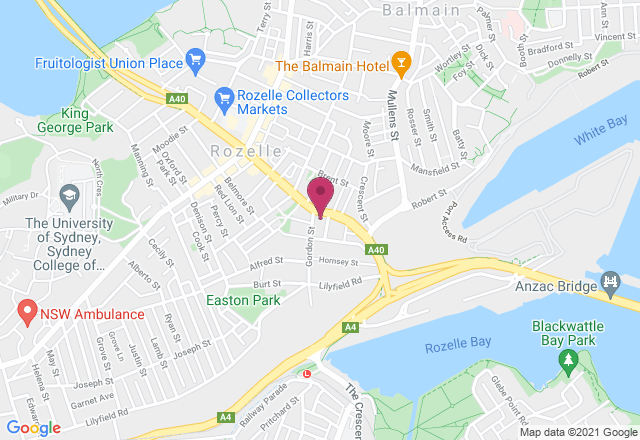
A1-2: Computer Room - 2A Gordon St, Rozelle NSW
Public transport is available from Victoria Road and Darling Street. We cannot guarantee that there will be parking available onsite due to the limited number of spaces. On weekdays, there are 11 onsite car spaces available for free parking. On weeknights and weekends, 15 onsite car spaces are available for free parking. There is also free council parking on the corner of Evans Street and Victoria Road. The surrounding street parking is limited as it is a residential area. Please be mindful of residents if parking on the surrounding streets.
Your teacher

Antony Brown
Antony is an Adobe and Apple Certified Instructor with over 15 years of experience teaching industry-leading design software. He began his training career with Adobe in London and has since worked with major clients such as Microsoft, Yahoo, Westpac, and the Australian Federal Police.
Antony is an Adobe Certified Expert in Photoshop CC, After Effects CS5, Premiere Pro CC, Audition, and Video Specialisation, and holds Apple certifications in Final Cut Pro X and 7. He is passionate about empowering learners and helping them achieve lasting skill development.
Your host
Sydney Community College is a social enterprise with a mission to offer innovative continuing adult education programmes that support individual efforts and facilitate sustainable social change.Our mission is to enrich lives, to strengthen adult individuals and to build communities through innovative high quality continuing education and training.

Gift this class
With our gift card, they can book this class at a time that suits them.
They can also choose from our 16,000+ other classes.
redeem Gifting optionsGift this class
check
Your recipient chooses the date
check
Also usable on ClassBento's 16,000+ other
classes
check
Happiness guaranteed, or your money back
check
Valid for 3 years
Book on ClassBento and enjoy exclusive perks:
-
Earn loyalty points
-
Money-back guarantee* for peace of mind
-
Local support from our Sydney-based team, rated 5 stars by customers
-
Public liability insurance included for your protection
-
ClassBento donates $1 to Dementia Australia with every paid booking
Join waitlist
Get updated when new dates for this class become available.
Unsubscribe any time.
Unsubscribe any time.
E.g. 'Sunday mornings', 'December', etc. We'll still email you about other new dates
Please don't include your contact details in this field
Gifting? Get a gift card, and your recipient can pick a date later.